 ballparker
Why did my meal photo skip the drink?
Most meal photos frame the plate. The glass sits beside it, so the drink never enters the shot. Log the drink on its own, or take a photo of the glass, can, or bottle.
Coffee, soda, juice, and alcohol beside the plate. Updated November 20, 2026.
Name the drink. Set how much you had. Log it on purpose, as its own entry, or with the meal only if you mean to. A photo of the glass, can, or bottle works the same way as a plate photo. A short description works when there is no photo. Read the estimate as a range. Fix the amount or the wording before you log, or edit the entry after.
Do not chase a chart of drink calories. Labels and serving sizes you already know are enough for the method. This page is not a calorie table and not medical advice.
The plate is where the eye goes. The glass, cup, or can is off to the side. An eye check of portion size looks at food on the plate. A meal photo often frames the plate alone. In both cases the drink never enters the check.
How to estimate portion sizes by eye already calls this out: drinks sit beside the plate, so an eye check of the plate skips them. Restaurant and no-scale guides list sugary drinks and alcohol among the easy misses. The fix is not a bigger plate photo. The fix is to treat the drink as something you log on purpose.
Oil and butter are a different miss. They are not in the photo estimate. Add them yourself when they matter for the food. A drink is still its own item even when the plate is correct.
Use the same flow you use for food.
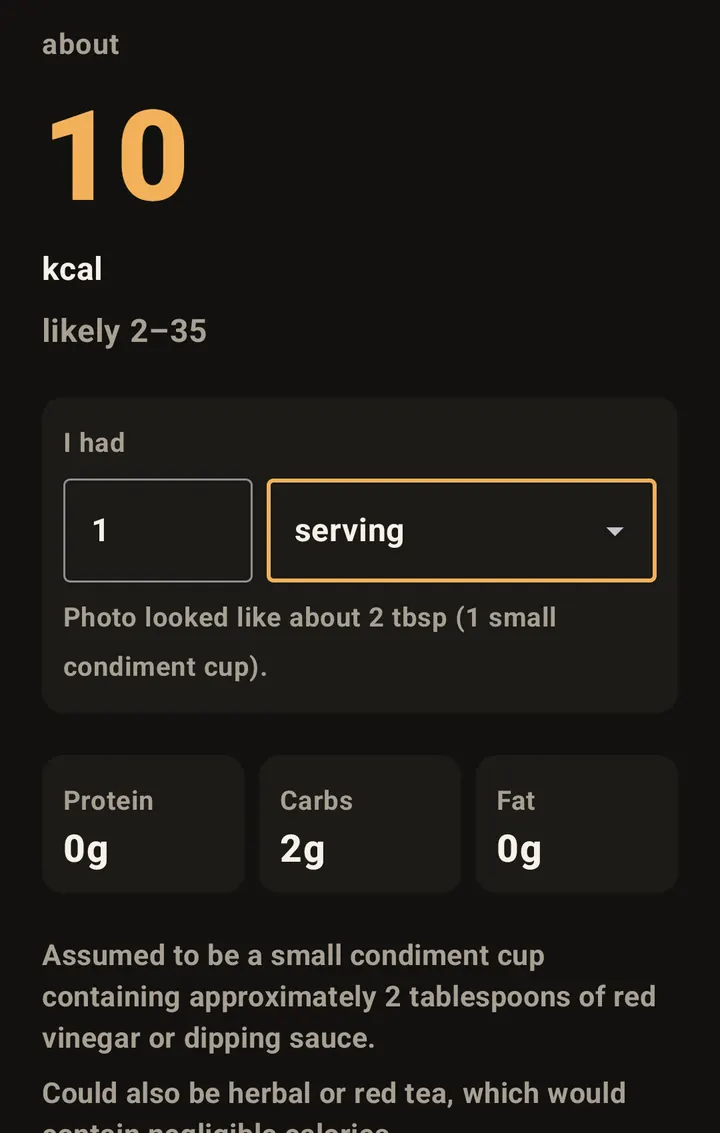
Log the drink as its own entry when you want the meal log to stay about the food. That matches how a meal someone else cooked treats drinks. If you intentionally describe the drink with the meal in one description, say so in the words so the estimate knows both are there. Do not assume a plate-only photo counted the glass beside it.
What a photo can miss, and why a range is the honest shape of the answer, is on how accurate photo calorie apps are.
You do not need a published list of drink calories to log alcohol.
Start with what you can name: beer, wine, a spirit, a mixed drink. Use the serving size you actually had when you know it from the label, the can, the bottle, or the pour you can describe. The amount starts at 1 serving. Change it when the pour was larger or smaller, or when you had a second drink as another entry.
Mixed drinks hide sugar and mixers the same way sauce hides on a plate. Name what you know. Say what you do not know. Do not invent a full recipe for the cocktail. Before you log, correct the estimate in plain words. After you log, edit the entry or start a new photo or description.
This is still a ballpark range, not a lab count. It is not medical advice and not a drinking guideline. If tracking the drink starts to feel like it runs the night, skip the log.
Restaurant meals that include a drink are covered in method form on estimate restaurant calories. This page is only the drink side.
Coffee, tea, soda, juice, and similar drinks use the same steps as alcohol. Name the drink. Set the amount. Photo or description. Range, then log.
First-week logging habits, including drinks as a common miss, are on calorie counting for beginners. Logging without a scale is on calorie tracking without a food scale.
Most meal photos frame the plate. The glass sits beside it, so the drink never enters the shot. Log the drink on its own, or take a photo of the glass, can, or bottle.
Only if you mean to describe both together. A separate entry keeps the meal about the food and makes a second pour easier to edit. Either way works when the words or photos match what you had.
No. Name the drink, set the serving amount you had, and use the range. Labels and known pour sizes help. A pasted calorie chart does not make the log more true.
Before you log, re-estimate in plain words. After you log, edit the name, calories, or macros, or start a new photo or description. A logged entry does not re-estimate from a note.
Oil and butter are not in the estimate. Add them yourself for the food when they matter. A drink beside the plate is not assumed from a plate-only photo. Log the drink on purpose.
Ballparker is on the App Store and Google Play. Back to Ballparker home.
Get it on the App StoreGet it on Google Play
New subscribers start with a 7-day free trial, then a monthly or yearly plan. Cancel before day 7 and you pay nothing.